When I first started blogging, I thought all I needed was a good idea and the ability to write. I was wrong.
Writing is just one part of blogging. You also need to research keywords, create eye-catching images, check your grammar, track your traffic, and make sure your content is SEO-friendly. Doing all of this without the right tools is exhausting and time-consuming.
The good news is you do not need to spend any money. There are excellent free tools available for every part of the blogging process. I have tried dozens of them over time, and these five are the ones I keep coming back to.
Why Every Blogger Needs the Right Tools
Blogging without tools is like cooking without utensils. You can technically do it, but it takes much longer, the results are inconsistent, and you end up making avoidable mistakes.
The right tools help you:
– Find topics that people are actually searching for
– Write content that Google can understand and rank
– Create images that make people stop and click
– Check and fix errors before you publish
– Track how your blog is performing over time
And the best part is all five tools in this list are completely free. No credit card required.
Top 5 Free Tools Every Blogger Needs in 2026
1. Google Search Console – For Tracking Your Blog’s Performance
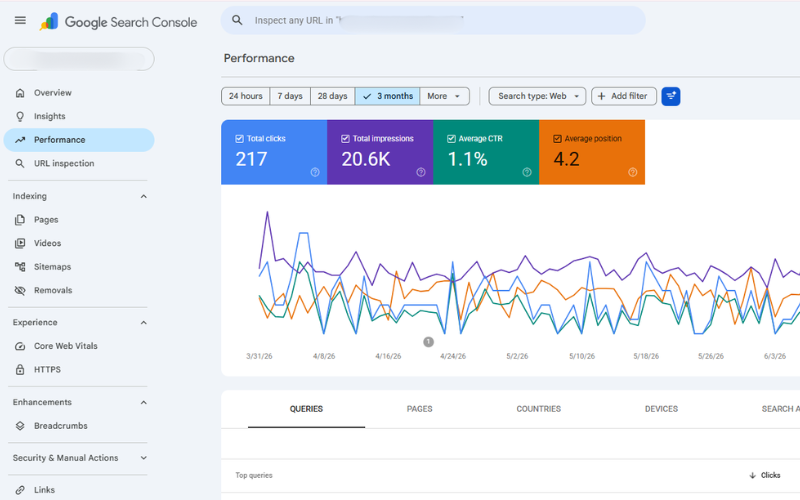
If you have a blog and you are not using Google Search Console, you are flying blind. This is a free tool by Google that shows you exactly how your blog is performing in search results.
With Google Search Console, you can see:
– Which keywords are bringing people to your blog
– How many people are clicking on your posts on Google
– Which posts are ranking on page 1st, and which ones need improvement
– Any technical errors on your site that Google has found
Setting it up takes about 10 minutes, and it is completely free. Go to search.google.com/search-console and add your website. Once it is connected, give it a few days to start collecting data and then check it regularly.
This is the single most important tool for any serious blogger.
2. Ubersuggest – For Keyword Research
Before you write any blog post, you need to know whether people are actually searching for that topic. This is called keyword research, and Ubersuggest makes it simple and free.
Go to ubersuggest.com, type in a topic you want to write about, and Ubersuggest will show you:
– How many people search for that keyword every month
– How difficult is it to rank for that keyword
– Related keywords and questions people are searching for
– What your competitors are writing about
The free version gives you 3 searches per day, which is more than enough when you are starting. Focus on keywords that have decent search volume but low competition. These are the ones where a new blog can actually rank.
3. Canva – For Creating Blog Images
Every blog post needs a featured image. Posts with good images get more clicks, more shares, and more time spent on the page. Canva makes it easy to create professional-looking images even if you have zero design skills.
Go to canva.com and create a free account. You will find hundreds of free templates for blog banners, featured images, social media posts, and more. Just pick a template, change the text and colors to match your blog, and download it.
For blog posts, use these sizes:
– Featured image – 1200×630px
– In-content images – 800×500px
– Square images – 800×800px
Canva’s free version has everything most bloggers need. You do not need to upgrade to Pro unless you want access to premium templates and images.
4. Grammarly – For Checking Grammar and Readability
Nothing hurts a blog’s credibility more than spelling mistakes and grammatical errors. Readers notice them immediately and lose trust in your content.
Grammarly is a free browser extension that checks your writing in real time as you type. It catches spelling errors, grammar mistakes, awkward sentences, and even suggests better word choices.
Install the free Grammarly extension from grammarly.com, and it will work automatically inside your WordPress editor, Google Docs, and almost everywhere else you write.
The free version catches the most important errors. The paid version offers more advanced suggestions, but honestly, the free version is enough for most bloggers.
5. Google Analytics – For Understanding Your Readers
Google Search Console tells you how people find your blog. Google Analytics tells you what they do once they get there.
With Google Analytics, you can see:
– How many people visited your blog today, this week, and this month
– Which countries and cities are your readers from
– Which posts are the most popular
– How long do people stay on your blog
– Whether they are reading on mobile or desktop
This information is incredibly valuable. When you know which posts your readers love, you can write more of the same. When you see that most of your readers are on mobile, you make sure your blog looks good on small screens.
Go to analytics.google.com, create a free account, and connect it to your blog. Your hosting provider or a WordPress plugin can help you add the tracking code if you are unsure how.
How to Use These Tools Together
These five tools work best when you use them together as part of your blogging process. Here is a simple workflow:
Before writing:
Use Ubersuggest to find a keyword worth writing about.
While writing:
Use Grammarly to catch errors and improve your writing as you go.
For images:
Use Canva to create your featured image and any in-content visuals.
After publishing:
Check Google Search Console to see if Google has indexed your post and how it is performing.
Every week
Check Google Analytics to see which posts are getting the most traffic and where your readers are coming from.
This simple routine will make your blogging more focused, more effective, and much less stressful.
Frequently Asked Questions (FAQ)
Yes, all five tools have completely free versions that are more than enough for most bloggers. Google Search Console and Google Analytics are 100% free, with no paid tiers. Ubersuggest, Canva, and Grammarly have paid upgrades but their free versions work perfectly well for beginners and intermediate bloggers.
Set up Google Search Console first — it is the most important one and takes time to collect data, so the sooner you set it up, the better. Then set up Google Analytics. After that, install Grammarly and create a Canva account before your next post.
You can absolutely start with just one or two. If you are just beginning, start with Grammarly (install it today — it takes two minutes) and Canva (create your featured images). Add Google Search Console and Analytics once your blog is live. Use Ubersuggest when you are ready to start doing keyword research.
Canva is more than good enough for blog images. Most professional bloggers use Canva for their featured images and social media graphics. You do not need Photoshop unless you are doing very advanced image editing.
Yes. Canva, Grammarly, and Google Analytics all have mobile apps. Google Search Console works on a mobile browser. Ubersuggest also works on mobile. So you can manage most of your blogging tasks from your phone if needed.
Final Thoughts
You do not need expensive software or a big budget to run a successful blog. These five free tools cover everything from finding the right topics to writing well, to creating great images, to tracking your results.
If you are not using all five of these yet, start today. Set up one tool at a time, learn how to use it, and then add the next one. Within a month, your blogging process will feel completely different, more organised, more data-driven, and much more effective.
Which of these tools do you already use? And which one are you going to try first? Share in the comments below. I would love to know!